How it works
Slowboard docs
Slowboard shows small, calm cards on an e-paper screen. You write the apps that draw them. Start with a card of your own.
Start here
- Write your first slowappDraw a card in Python and see it as it would look on the screen. About fifteen minutes, no hardware.
- Learn how slowapps workCards, feeds, jobs and what an app is allowed to touch, then tutorials built on the Reminders and Weather apps.
- Run a hubInstall slowhub, add apps and choose what goes where on your screen.
- Build a Slowboard 1085Print the case, wire the keys, flash the card and get the board on Wi-Fi.
- A slowappdraws a card
- slowhubruns the app on time and keeps the card
- slowdputs the card on the screen and answers the keys
The parts
- slowappsSmall programs that draw your cards: the weather, a reminder, anything you can put in a picture.
- slowhubThe hub. It runs your slowapps on time and keeps their latest cards ready for your screens.
- slowdThe display program. It puts cards on the screen, shows what each key does and answers key presses.
- slownetGets a Slowboard onto Wi-Fi with a hotspot and a QR code, then gets out of the way.
Also: the glossary, troubleshooting, and the protocol slowd and slowhub speak.
Slowboard shows a few cards on a screen that changes rarely: today’s weather, the next thing on your calendar, a question such as “Water the plants?”. Each card is a picture drawn by a small app. The screen updates every half hour or so, and you move through the cards with a few keys.
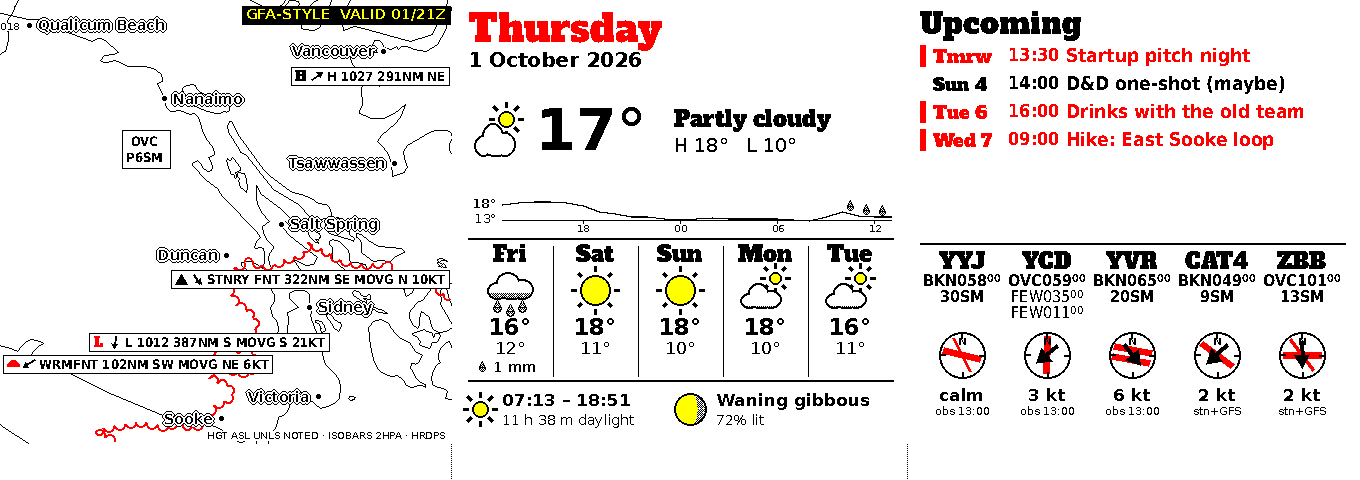
The Weather app’s cards as they appear on a Slowboard 1085, rendered from the app’s test data.
Apps draw the cards
A slowapp is a small program that draws cards. It gets a size and a time (“draw a 452 × 444 card for 10:00”), draws a picture in the screen’s colours, and exits. It can be written in any language, and it is packaged as a container image so it runs the same way on every hub. Python apps get a library and a template that do the fiddly parts for you.
Three apps exist today:
- Weather draws a forecast map, today’s conditions and airport weather. It fetches data from the internet.
- Reminders asks questions such as “Water the plants?” and shows what happens when you answer.
- Calendar shows upcoming events. It is being moved into a slowapp.
To write one, start with the quickstart.
The hub runs the apps
slowhub is the hub. It runs your slowapps just before the screen needs fresh cards, keeps the latest cards from each app, and hands them to your screens. It also holds your settings: which apps you have, which card goes where on the screen, and when the screen may update.
slowhub runs wherever there is a Linux machine with enough memory. On a Slowboard 1085 it runs on the board itself. It can also run on a computer of your own, and a hosted hub run by us is coming soon. A screen always gets its cards from exactly one hub.
The screen shows them
slowd is the program that drives a screen. It fetches cards from the hub, places them on the screen according to the layout, and decides when the screen may refresh. E-paper wears out if the same pixels refresh too often, so slowd keeps every part of the screen within the panel’s limits.
The layout divides the screen into slots, and each slot shows cards from the apps you choose. A Slowboard 1085 starts with three slots side by side, but a layout can divide the screen differently.
Keys and questions
The Slowboard 1085 has four keys: ▲ red, ◆ yellow, ■ black and ● white. They are generic. What a key does at any moment is printed in the strip along the bottom of a card: show the next card, go back to the first one, or give one of up to four answers to a question, with a tap or a hold.
When an app asks a question, the question appears on the screen with its answers in the strip. You press the key shown next to the answer you want, the screen shows a short reply such as “Done ✓, next due tomorrow 09:00”, and the answer goes back to the app.
A press shows its result straight away, without waiting for the hub or the internet. That works because slowd already holds every card a press can lead to: apps draw the follow-up cards in advance, and slowd keeps them with the screen.
How a card gets to the screen
- slowd tells the hub which cards it needs and by when, for example “the cards for the left slot, by 10:00”.
- slowhub works out when to start each app so that everything is ready in time, and runs it.
- The app draws its cards and exits. slowhub checks each card’s size and colours and stores it.
- slowd fetches the new cards and, at 10:00, refreshes the parts of the screen that changed.
If the hub or the internet goes away, the screen keeps showing what it has and the keys keep working. Old cards get a small “as of 09:30” note instead of disappearing.
slowd and slowhub talk over a small HTTP protocol, described in the protocol reference. You don’t need it to write apps.
Where to go next
- Write an app: the quickstart, then How slowapps work.
- Run a hub: Install slowhub and Install a slowapp.
- Build a board: Set up a Slowboard 1085.
- Look up a word: the glossary.