Tutorial
A networked app: the Weather app
How an app that fetches from the internet is set up: network and storage grants, test data saved from real fetches, failures the hub retries, and secrets.
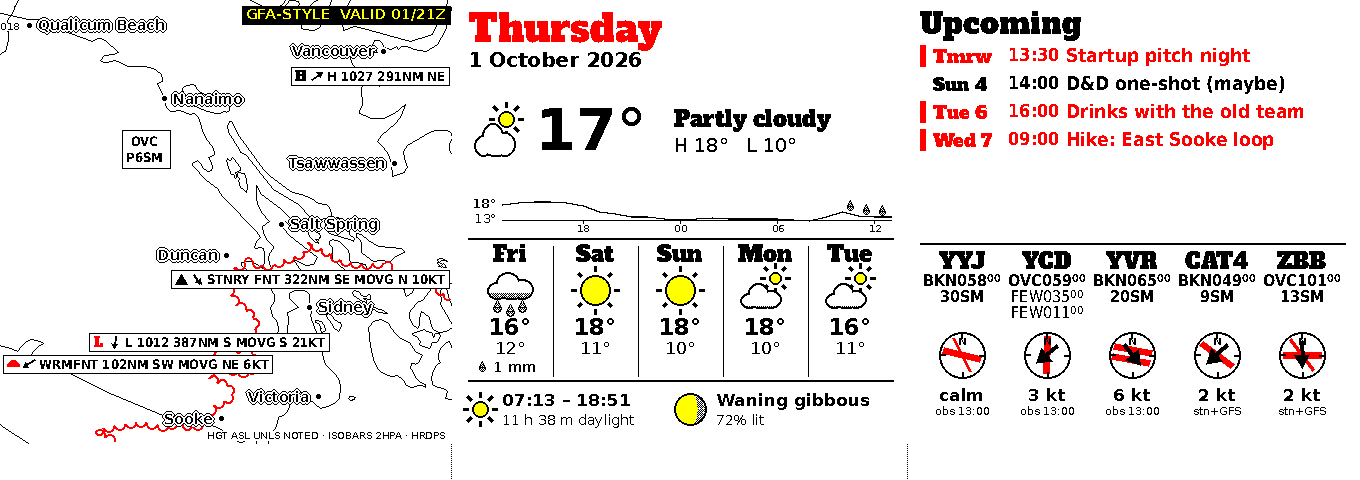
Weather draws three cards for the Slowboard 1085: a forecast map, today’s conditions, and airport weather with upcoming events. It fetches from several weather services on every run, so it shows how a networked slowapp is put together. In this tutorial you render Weather from its saved data, read how it is set up, and then write a small networked app of your own with the Python SDK.
You need the tools from the quickstart.
1. Render Weather from saved data
git clone https://github.com/mike-anderson/slowapp-weather
cd slowapp-weather
docker build -t slowapp-weather:dev .
PYTHONPATH=/tmp/slowapp ~/.slowapp-venv/bin/python -m slowapp_sdk fixture --image slowapp-weather:dev
ok    live                0.9 s  left: 1 cards  middle: 2 cards  right: 2 cards
        left/home: a30f5353057dcd5878d869b120e14c24bd1f752e22c5de341041b83e82828593
        middle/home: c0fc1ca99d6639a1f5943e41b22d936a1527aa19876b836e9438a54e2409206f
        middle/hours: 3a859901a41000a4f69a035a11c6c6ff0e8a624c9a1ea475e5b939f7da02c5ad
        right/home: 7e8ec2210f78bf5be979d2f38a78df8f4f912340efa2de94dc838e95e0fbd026
        right/metar: 7f65a7c1b100dd90e7d9f687b627c200e19cdc2e53d49094fb3918c109ac86bc
1/1 examples passed; previews in out/previews
This ran without any network: the example uses data saved from a real run on 1 October 2026. out/previews/weather-live-frame.png is the whole screen:
2. Read the manifest
[app]
id = "weather"
title = "Weather"
contract = 3
image = "ghcr.io/mike-anderson/slowapp-weather"
memory = "256m"
tmp = "64m"
timeout_s = 300
network = "egress"
data = { max_mb = 8 }            # /data/geomet: HRDPS tiles, memoised per valid hour, pruned after 2 days
cache = { tmpfs_mb = 8 }         # /cache/weather: the rest of the API cache, in RAM
imports = ["calendar:agenda"]    # P4 transitional (R3): the right third's agenda until the P5 split

[[job]]
name = "render"
expected_s = 52

[[feed]]
name = "left"
size = "slot"

[[feed]]
name = "middle"
size = "slot"

[[feed]]
name = "right"
size = "slot"

[[example]]
name = "live"
caption = "1 Oct 2026 13:15: HRDPS GFA map, WPC fronts, Victoria conditions, airports, a made-up agenda"
fixture = "fixtures/live-2026-10-01"
now = "2026-10-01T13:15:00-07:00"
feeds = { left = "452x444.k4", middle = "456x444.k4", right = "452x444.k4" }
Compared with Reminders:
network = "egress"lets the app make outgoing connections. These reach your home network as well as the internet.data = { max_mb = 8 }gives it a private folder,/data, that survives between runs. Weather keeps downloaded map tiles there so it doesn’t fetch the same hour twice.cache = { tmpfs_mb = 8 }is a scratch folder in memory,/cache, for everything else it caches. It is emptied when the container stops, and it counts againstmemory.memory = "256m"andtimeout_s = 300: map rendering needs more room and time than a reminder.- Three feeds, one for each card position Weather was designed for. You can put any of them in any slot that has the right size.
importsis transitional, as in Reminders: until Calendar is its own slowapp, Weather reads its event list from the older system.
3. Failures and retries
Weather wraps an older renderer, and its render job turns that renderer’s result into one of the outcomes the hub understands:
- If the renderer fails or runs out of time during a live run, the job raises
Transient. The hub keeps the cards it has and tries again later. A failed fetch is almost always temporary. - In a test render there is no network to blame, so a failure is a real bug and fails the check.
- On success it writes a summary for the hub’s app card with an Update now button:
ctx.write_summary("ok", titles, [{"label": "Update now", "job": "render"}])
The Python SDK reference lists the exceptions and the exit code each one becomes.
4. Write a networked app
Weather predates the SDK’s helpers for fetching, so a new app can be simpler. This one shows the current temperature from Open-Meteo, a free weather API that needs no key.
temp.py:
from datetime import timedelta
from PIL import ImageDraw
import slowapp_kit as kit
from slowapp_kit import BLACK, Card
URL = "https://api.open-meteo.com/v1/forecast?latitude={lat}&longitude={lon}¤t=temperature_2m"
@kit.job("render")
def render(ctx):
surface = ctx.feed("now")
if surface is None:
return
url = URL.format(lat=ctx.settings["latitude"], lon=ctx.settings["longitude"])
data = ctx.fetch("forecast.json", lambda: ctx.http_json(url)) # 1. fetch every input first
ctx.exit_if_unchanged() # 2. stop here if nothing moved
temp = data["current"]["temperature_2m"] # 3. then draw
img = ctx.canvas(surface)
d = ImageDraw.Draw(img)
d.fontmode = "1"
d.text((surface.w // 2, surface.h // 2), f"{temp:.0f}°", font=kit.font("DejaVuSans-Bold.ttf", 120),
fill=BLACK, anchor="mm")
ctx.write_feed("now", [Card("home", img, "Temperature", peek=f"{temp:.0f}° now")],
valid_from=ctx.for_, valid_until=ctx.for_ + timedelta(hours=1))
ctx.write_summary("ok", [f"{temp:.0f}° now"], [{"label": "Update now", "job": "render"}])
kit.main()
slowapp.toml:
[app]
id = "temp"
title = "Temperature"
contract = 3
image = "ghcr.io/you/slowapp-temp"
memory = "48m"
tmp = "8m"
timeout_s = 60
network = "egress"
data = { max_mb = 1 }

[settings]
latitude = { type = "number", default = 48.43, label = "Latitude" }
longitude = { type = "number", default = -123.37, label = "Longitude" }

[[job]]
name = "render"
expected_s = 5

[[feed]]
name = "now"
size = "slot"

[[example]]
name = "victoria"
fixture = "fixtures/victoria"
now = "2026-10-07T09:00:00-07:00"
feeds = { now = "452x444.k4" }
The Dockerfile is the quickstart’s, with temp.py in place of hello.py.
Fetch first, then draw
ctx.fetch(name, fn) is the key to testing a networked app:
- In a live run it calls
fn(), saves the result to/data/snapshots/<name>, and returns it. - In a test run it never calls
fn(). It reads the saved copy from the example’s fixture instead.
So fetch every input through ctx.fetch before you draw anything. Then a live run’s /data/snapshots/ folder is, as it stands, a fixture.
ctx.http_json and ctx.http_get fit their timeout to the job’s deadline. A network error becomes Transient (the hub retries later), and HTTP 401 or 403 becomes NeedsConfig (the hub waits until a setting or secret changes).
ctx.exit_if_unchanged() ends the job with “unchanged” when every fetched input is byte-for-byte the same as last time, so the hub keeps the old cards and nothing is redrawn. Open-Meteo puts a fresh timestamp in every response, so for this API it rarely triggers.
Make the fixture
Run the job once for real on your computer, outside a container, so it saves its snapshot. Test without hardware explains the variables:
SLOWAPP_FONTS=/tmp/slowapp/fonts SLOWAPP_MANIFEST=slowapp.toml \
SLOWAPP_STATE=./data SLOWAPP_OUT=./out SLOWAPP_IN=./in SLOWAPP_JOB_LOCK=./job.lock \
SLOWAPP_FEEDS='[{"feed":"now","w":452,"h":444}]' \
PYTHONPATH=/tmp/slowapp ~/.slowapp-venv/bin/python temp.py job render
Then copy the snapshots into the fixture and render the example:
mkdir -p fixtures/victoria && cp -r data/snapshots fixtures/victoria/
docker build -t slowapp-temp:dev .
PYTHONPATH=/tmp/slowapp ~/.slowapp-venv/bin/python -m slowapp_sdk fixture --image slowapp-temp:dev --repeat
ok    victoria            0.2 s  now: 1 cards
        now/home: ca59fbe7…
1/1 examples passed; previews in out/previews
Your card’s id will differ: it depends on the temperature you fetched. Add an example for every state worth seeing: a hot day, a cold one, an API error.
5. Secrets
If an API needs a key, list it in the manifest and read it with ctx.secret:
[app]
secrets = ["api_key"]
key = ctx.secret("api_key")
In a live run this reads /run/secrets/api_key. If it is missing, the job stops with “needs config” and the hub doesn’t retry until the secret is set. In a test render there are no secrets: ctx.secret("api_key") returns the placeholder fixture-api_key, which is one more reason to fetch through ctx.fetch.
TODO(owner): how does someone running a hub set a secret for an app today? (The docs used to say
slowhub app secret set, which the hub doesn’t have yet.)